


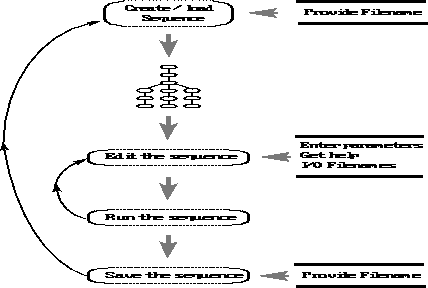
Figure: Typical user session with the graphical tool of DSU.
Figure  shows a typical session with the DSU graphical
tool. The user usually loads or creates a sequence of applications and
then spends most of the time providing parameters to the applications,
adding and removing single applications to the sequence and executing it.
The user will occasionally save the current sequence with some specific
parameters and then modify them and save again. Next, we discuss some
typical actions when using DSU.
shows a typical session with the DSU graphical
tool. The user usually loads or creates a sequence of applications and
then spends most of the time providing parameters to the applications,
adding and removing single applications to the sequence and executing it.
The user will occasionally save the current sequence with some specific
parameters and then modify them and save again. Next, we discuss some
typical actions when using DSU.
There are two ways to start the creation of a SU application graph,
the first one is to use the load button to load a previously created
sequence and work from there. The second one consists of clicking the
 or
or  buttons to bring up the panel containing all the available SU applications,
then by clicking twice on the desired one, that application gets
added to the sequence just after the current one.
buttons to bring up the panel containing all the available SU applications,
then by clicking twice on the desired one, that application gets
added to the sequence just after the current one.
The GUI provides a button to select the type of execution that the user wants DSU to perform. Clicking in this button will raise a menu with two options for execution: one is called Local and the other Distributed. The local option corresponds to execute the sequence as in a regular Unix-shell environment. The Distributed option will execute the sequence over the multiprocessor environment available.