


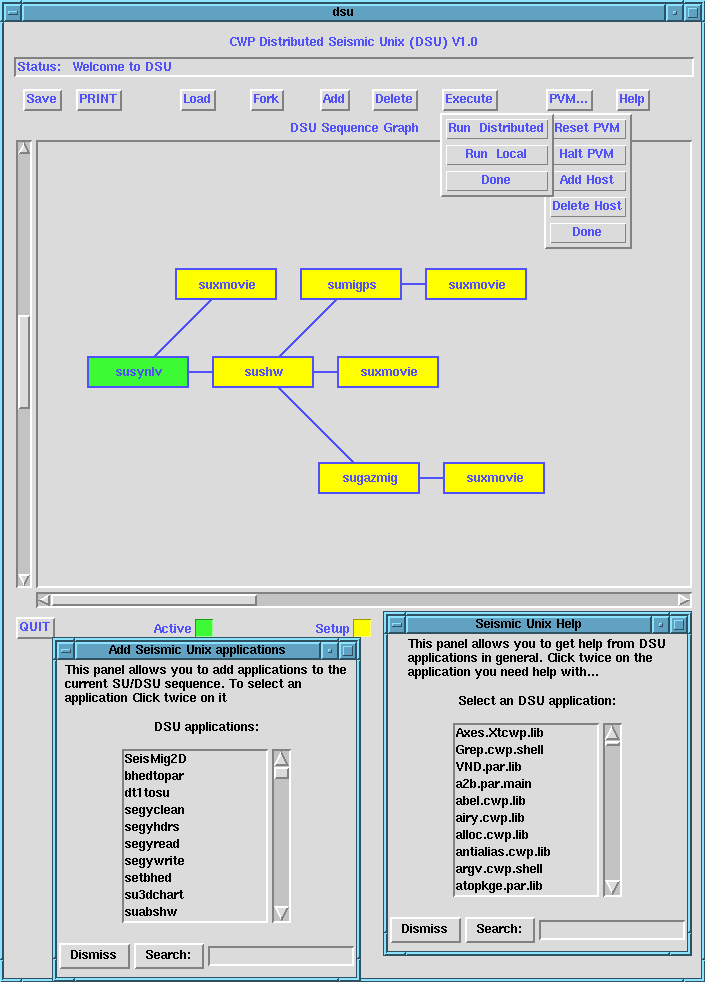
Figure: DSU Graphic User interface and some of its menus.
DSU provides a graphical user interface (GUI) tool for creating, editing, setting parameters and executing a graph representing a sequence of SU applications on a multiprocessor environment. It allows the user to set up application parameters, input/output filenames, and other similar tasks related to the applications. It provides a context sensitive help about almost every component of SU. It also allows the user to interactively check the source code of selected main programs and subroutine library functions.
Figure  shows DSU main interface. The upper part
of the interface window is a message widget, where the current status
is displayed. Beneath it, there is a panel of buttons that allow the
user to build and handle the sequence of applications.
The
shows DSU main interface. The upper part
of the interface window is a message widget, where the current status
is displayed. Beneath it, there is a panel of buttons that allow the
user to build and handle the sequence of applications.
The  button allows the user to save the current
sequence of applications. It will allow the user to surf over the
available file system to select the appropriate place to store the
sequence. The sequence is saved in a plain ASCII file using the format
that was
previously described. The
button allows the user to save the current
sequence of applications. It will allow the user to surf over the
available file system to select the appropriate place to store the
sequence. The sequence is saved in a plain ASCII file using the format
that was
previously described. The  button will display the information
contained on each element (application), belonging to the subsequence
starting at the current node, in the screen.
This information includes application name,
parameters names and values.
The
button will display the information
contained on each element (application), belonging to the subsequence
starting at the current node, in the screen.
This information includes application name,
parameters names and values.
The  button allows the user to load a sequence of applications
represented in a plain ASCII file.
button allows the user to load a sequence of applications
represented in a plain ASCII file.
The second group of buttons are intended to handle single
application nodes (single nodes of the graph). The  and
and
 buttons
prompt the user for an application name to be added to the graph
just after the current one. The current application is highlighted
with a green color. A node of the graph becomes the current one if
it was the last one inserted, if the user clicked the left mouse
button on it or if one of its children nodes was removed. The
button allows the user to create branches in the sequence. The delete
buttons
prompt the user for an application name to be added to the graph
just after the current one. The current application is highlighted
with a green color. A node of the graph becomes the current one if
it was the last one inserted, if the user clicked the left mouse
button on it or if one of its children nodes was removed. The
button allows the user to create branches in the sequence. The delete
 removes the current node from the graph. DSU ensures that
nodes with multiple branches deriving from them can not be removed.
removes the current node from the graph. DSU ensures that
nodes with multiple branches deriving from them can not be removed.
The third group of buttons has to do with executing the
represented sequence. The  button is actually a menu
with two options. The first option allows the execution of
the sequence with regular SU (under pipeline communication); since it
is not possible to execute multi-branch sequences via pipe-file
communication,
only the main branch of a multi-branch sequence will be executed.
This is useful when we want to test only the main branch of a
sequence. The second option allows a distributed execution of
the sequence. By selecting it, the user will fire the DSU
distributing task. This task will initiate each application of
the sequence on the machine best suited to its needs and will
setup the communication among them accordingly to the arcs of the graph
representing the sequence.
button is actually a menu
with two options. The first option allows the execution of
the sequence with regular SU (under pipeline communication); since it
is not possible to execute multi-branch sequences via pipe-file
communication,
only the main branch of a multi-branch sequence will be executed.
This is useful when we want to test only the main branch of a
sequence. The second option allows a distributed execution of
the sequence. By selecting it, the user will fire the DSU
distributing task. This task will initiate each application of
the sequence on the machine best suited to its needs and will
setup the communication among them accordingly to the arcs of the graph
representing the sequence.
The other button associated with the execution of the
graph (sequence) handles the interface with the message-passing
system, PVM. As shown in Figure , the button
labeled  is a
menu with options to start, stop and reset PVM. Additionally,
it allows the insertion and removing of machines to the
virtual machine.
is a
menu with options to start, stop and reset PVM. Additionally,
it allows the insertion and removing of machines to the
virtual machine.
The farthest right button of the interface is the  button. This button will prompt the user for the entity he/she
needs help with. There, one can request help about almost anything
related with SU: library functions, main programs and other. Once the
user has selected the entity, a scrollable window containing the
help for that entity will be shown. When obtaining help for SU main
applications, an
button. This button will prompt the user for the entity he/she
needs help with. There, one can request help about almost anything
related with SU: library functions, main programs and other. Once the
user has selected the entity, a scrollable window containing the
help for that entity will be shown. When obtaining help for SU main
applications, an  button is provided to be able to see the source
code of the application.
button is provided to be able to see the source
code of the application.