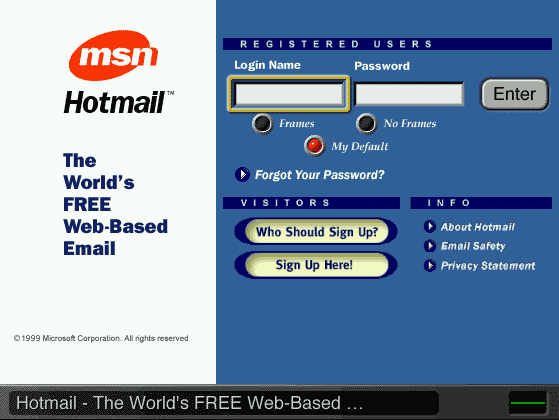
Making Text Work across Platforms WebTV generally does a good job of resizing and displaying HTML text -- "normal" Web page text with HTML tags such as bold, italic, or headline -- so that it's easily readable on a TV screen. To make your Web pages work well on WebTV as well as other platforms, you need to find and fix the problems that do occur. Most problems occur in the following three areas. Small text embedded in graphics Navigation bars, as described in another section, are the most common culprit here. The solutions that work for navigation bars -- making the embedded text larger, using a browser sniffer to provide different graphics for WebTV systems, and using HTML text instead -- also apply to other graphics with text in them. Inappropriate text color or contrast Bright red and some other colors glow when used as text or background colors on a TV screen, making text hard to read. Also, some color combinations that work well on a computer monitor don't provide sufficient contrast on a TV screen. When poor color choices are used along with small text in navigation graphics, the result can be very hard to use on WebTV. An example: The text in the navigation graphic at www.aol.com, when viewed on WebTV, suffers from a bright red background that "glows" on a TV screen, and from an orange text/red background combination that suffers from poor contrast on a TV screen. To make text readable on a television screen, use colors and color combinations that work well on both personal computers and TV. For the real lowdown on color choices for text and backgrounds, read Cross-Platform Color for PCs and TVs. Layout problems that make text difficult to read When HTML text that's shoehorned into a narrow column is displayed in a larger font size on WebTV, it often gains additional line breaks that make the text hard to read. For an example of such a layout problem, go to www.hotmail.com, as shown in Figure 4. When viewed on WebTV, the words "My Default" appear on the line following the radio buttons, making it hard to understand what the radio buttons do.
Figure 4. HotMail home page on WebTV You have a range of options for solving layout problems:
Tip: Forms elements Previous section: A quick fix: Navigation bars on WebTV
|